Table of Contents
- What are conference room occupancy sensors?
- The problem with booking-only room management
- How occupancy sensors support better room status
- Three workflows occupancy sensors can support
- Why the room display still matters
- How GOGET connects occupancy sensors with room booking
- Why this makes meeting rooms feel more modern
- What to check before rolling out occupancy sensors
- Common misconceptions about room occupancy sensors
- Best practices for using sensors in meeting room booking
- Conclusion: smarter room booking starts with real-world presence
- FAQ: Conference room occupancy sensors
Conference room occupancy sensors help workplace teams understand whether a meeting room is actually in use, not just whether it is booked. That matters because calendar-based booking systems can show what should happen, while real office behavior often tells a different story.
A meeting can be booked but never used. A room can be occupied without a formal reservation. A meeting can end early while the room remains blocked in the calendar. Over time, these small gaps create frustration for employees, reduce trust in room availability, and make it harder for Facilities, IT, and workplace teams to understand how meeting spaces are really being used.
That is where occupancy sensors become useful. When connected to a modern room booking workflow, they add a real-world presence signal to the booking system. The result is a smarter meeting room experience: clearer room status, more useful automation, and better data for workplace planning.
What are conference room occupancy sensors?
Conference room occupancy sensors are devices that detect whether a meeting room appears to be in use. In many workplace deployments, this is done with a PIR sensor, which detects presence or movement through infrared sensing.
The important point is that an occupancy sensor is not the same as a camera, microphone, or people-counting system. A PIR-based room sensor is designed to provide a simple signal: there appears to be presence or movement in the room, or there does not.
For workplace teams, that signal can help answer practical questions such as:
- Is a booked meeting room actually being used?
- Has someone walked into a free room for an ad hoc meeting?
- Did a scheduled meeting start without a manual check-in?
- Has a room become empty before the booking ends?
- Are certain rooms underused, overbooked, or used differently than expected?
In other words, conference room occupancy sensors help connect booking data with real-world room behavior. For a more introductory explanation, see GOGET’s guide: What Is a Meeting Room Occupancy Sensor?
The problem with booking-only room management
A meeting room booking system is essential, but bookings alone do not always reflect what is happening in the office.
A calendar event can reserve the room, but it cannot always confirm that people arrived. Employees may book rooms “just in case,” forget to cancel, or move the meeting elsewhere. In hybrid workplaces, attendance can change quickly, which makes room demand harder to predict. This creates several common problems:
- No-shows: A room is booked, but nobody uses it.
- Ghost meetings: Recurring meetings continue to block rooms after they are no longer needed.
- Early finishes: A room stays unavailable even after people leave.
- Ad hoc use: Employees step into a free room without making a booking.
- Low trust: Employees stop trusting the booking system when rooms appear busy but are empty.
For employees, this creates friction. For workplace teams, it creates misleading utilization data. A room may look busy in the calendar but be physically empty for large parts of the day.
A meeting room booking occupancy sensor helps close that gap by giving the system a signal from the room itself. This is especially useful when combined with a broader room booking system that supports check-in, room release, and real-time room status.
How occupancy sensors support better room status
A booking system shows scheduled intent. An occupancy sensor adds a presence signal.
Together, these two signals can make room status more useful. Instead of relying only on calendar data, the system can compare what was booked with what appears to be happening in the room.
For example:
- If a room is booked and presence is detected, the room can appear as in use.
- If a room is booked but no presence is detected after a configured threshold, the system may support a no-show workflow.
- If a room is free and presence is detected, the system may support ad hoc booking or auto booking.
- If a room becomes empty before the scheduled end time, the system may support a vacancy-release workflow.
The exact behavior depends on the room booking solution, settings, room rules, sensor placement, and deployment configuration. That distinction matters. Sensors do not magically solve every booking issue on their own. They become valuable when the presence signal is connected to a well-designed room booking workflow.
Three workflows occupancy sensors can support
When implemented well, conference room occupancy sensors can support several practical workflows. These workflows are especially useful in busy offices where meeting room demand changes throughout the day.
1. Auto booking for ad hoc meetings
Employees often walk into an available room for a quick discussion. Without a booking, the room may still appear free to everyone else, which can create interruptions or double-use conflicts.
With auto booking, walking into a free room can trigger a booking workflow when configured to do so. This helps align the calendar with actual room use.
This can be useful for:
- quick team discussions
- spontaneous collaboration
- phone calls or video calls
- short project check-ins
- employees who need a room immediately
The benefit is simple: the room status becomes more accurate without requiring employees to stop and manually update the booking system every time.
2. Assisted check-in for scheduled meetings
Many room booking systems use check-in to confirm that a scheduled meeting is actually happening. This helps reduce no-shows and can make unused rooms available again.
The challenge is that manual check-in requires employee action. People may forget to tap the display, especially when they are focused on starting the meeting.
A sensor-supported workflow can help by using presence as an additional signal. If a scheduled meeting is about to begin and the room appears occupied, the system may support assisted check-in based on configuration.
This makes the meeting room experience feel more modern and less dependent on manual steps. It also helps workplace teams keep room status closer to reality.
3. Vacancy release when meetings end early
Meetings often finish before the scheduled end time. Without a release workflow, the room remains blocked even though it is empty.
Vacancy release can help make that time available again. If the room appears vacant after a configured period, the system may release the room so others can book it.
This is one of the most practical ways a meeting room booking occupancy sensor can improve everyday office flow. It helps employees find rooms that would otherwise remain hidden behind outdated calendar reservations.
For Facilities and workplace teams, it also creates better insight into how rooms are actually used compared with how they are booked. Related reading: What Are Ghost Meetings and How Can Workplaces Reduce Them?
Why the room display still matters
Occupancy sensors do not replace meeting room displays. They make them more useful.
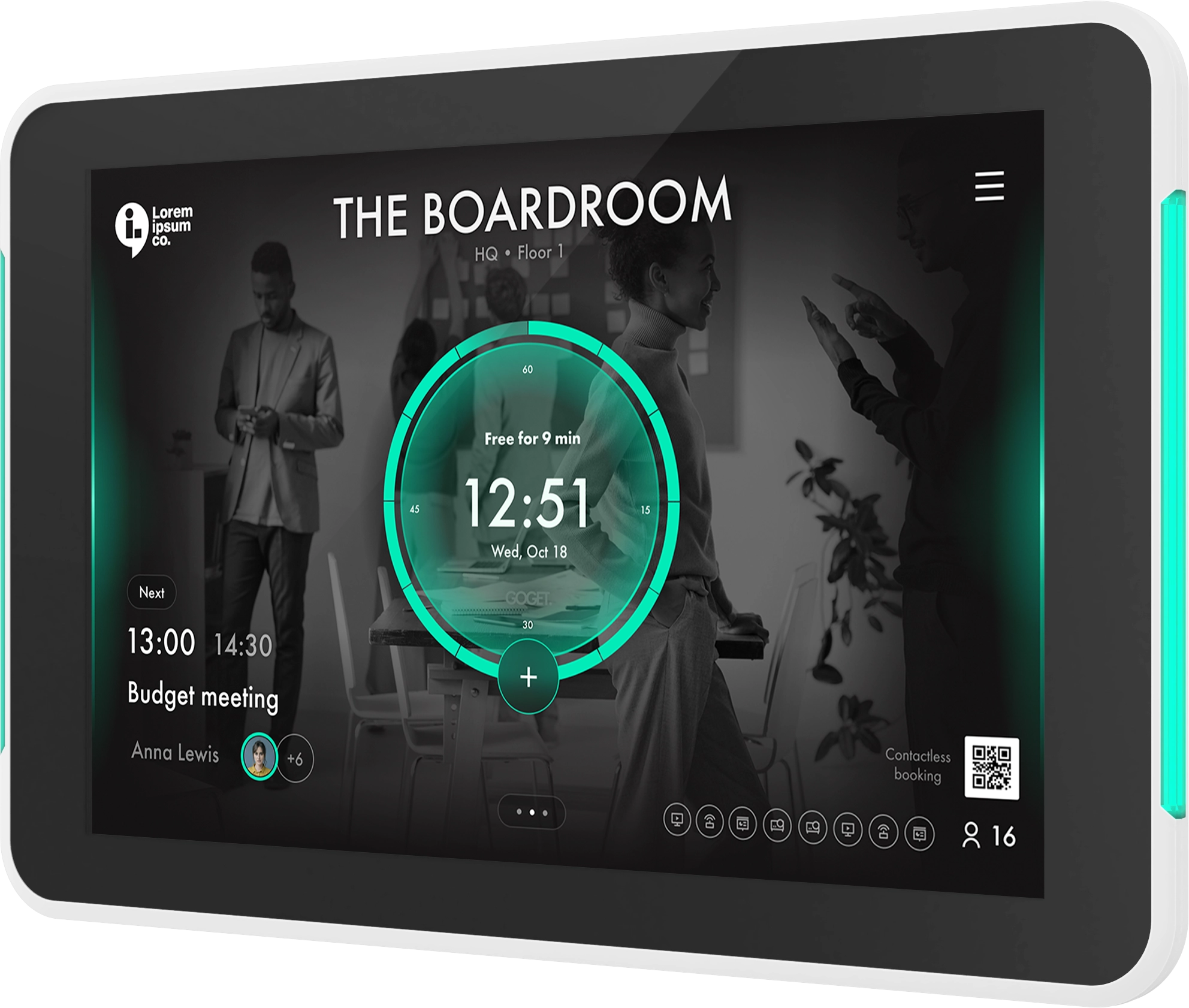
A room display is still the visible, human-facing part of the meeting room workflow. It shows employees whether a room is free, busy, or soon available. It can also support booking, check-in, schedule visibility, nearby-room search, and other room actions.
Sensors work best when they support that experience in the background. The display remains important because employees still need a clear and trusted interface at the room.
A smart meeting room setup usually needs both:
- The display gives employees a visible interface for status, booking, and check-in.
- The sensor adds a real-world presence signal.
- The booking platform connects calendar data, room rules, automation, and reporting.
- The admin portal gives workplace teams control over settings, telemetry, and behavior.
This is why occupancy sensors should be viewed as an extension of room booking, not as a standalone gadget. For hardware considerations, read How to Choose Room Schedule Display Hardware.
How GOGET connects occupancy sensors with room booking
GOGET’s approach is designed around the meeting room workflow rather than treating sensors as a separate IoT layer.
GOGET Room Sensors are built into the GOGET One ecosystem. The occupancy sensor communicates directly with an assigned GOGET One via BLE, which means deployments can avoid separate gateways, hubs, extra servers, extra wiring, programming, or third-party sensor services.
That matters for IT and Facilities teams because sensor infrastructure can otherwise become complex. A sensor project that requires separate gateways, separate management tools, and extra network planning may create more operational work than expected.
With GOGET, the sensor is part of the room booking environment. Sensor behavior, automation, and telemetry are managed in the admin portal, including sensor health monitoring, battery levels, and configuration per device and workspace.
GOGET describes three sensor-supported automation scenarios:
- Auto booking: walking into a free room can book the room.
- Assisted check-in: presence can help confirm attendance for a scheduled meeting.
- Vacancy release: a room can be freed automatically when a meeting ends early.
These workflows should be described carefully because actual behavior depends on configuration, plan, room rules, sensor placement, and deployment setup. The practical value is that GOGET can help turn meeting rooms into smarter, more responsive spaces where booking status is informed by both calendar data and room presence.
Why this makes meeting rooms feel more modern
The strongest reason to consider conference room occupancy sensors is not just analytics. It is the employee experience.
A smart meeting room should reduce small points of friction. Employees should be able to see whether a room is available, trust the status they see, and use spaces without unnecessary admin steps.
Sensor-supported booking helps create that experience by making the room more responsive to real behavior.
For employees, this can mean:
- fewer empty-but-booked rooms
- clearer room availability
- less need to manually correct booking status
- fewer interruptions during ad hoc meetings
- more confidence that room displays reflect reality
For workplace teams, this can mean:
- better visibility into actual room usage
- more reliable utilization data
- more useful no-show and release workflows
- simpler sensor deployment through the room display ecosystem
- stronger support for hybrid workplace planning
The “smart” part is not the sensor alone. It is the connection between the sensor, room display, calendar system, admin controls, and workplace insights.
What to check before rolling out occupancy sensors
A successful sensor rollout depends on more than choosing the sensor itself. Workplace teams should think through the operating model before enabling automation.
1. Admin controls
Start by checking what admins can configure. Useful controls may include room-specific automation settings, thresholds, sensor assignment, battery visibility, and sensor health monitoring.
Different rooms may need different rules. A small focus room, a large boardroom, and a casual collaboration space may not behave the same way.
2. Sensor telemetry
Sensors should be manageable after installation. Admins need visibility into whether a sensor is active, assigned correctly, and reporting as expected.
Telemetry is especially important when scaling across many rooms or locations. Without it, troubleshooting becomes harder.
3. Battery monitoring
Battery-powered sensors reduce wiring complexity, but they still need lifecycle management. Check how battery levels are surfaced and how replacement routines will work.
This is especially important for larger deployments where Facilities teams may manage sensors across multiple floors or offices.
4. Sensor placement
PIR sensors are sensitive to placement. A sensor should be positioned to detect the intended room area without picking up irrelevant movement outside the room.
Placement considerations include:
- room size and shape
- seating area coverage
- glass walls
- doors and corridors
- HVAC airflow
- sunlight and heat sources
- rooms with multiple entrances
- people sitting still for long periods
Testing placement in real rooms is important before scaling the deployment. For a broader rollout perspective, see How to Successfully Implement a Meeting Room Booking System.
5. Room types
Not every room needs the same automation. Some rooms may benefit most from assisted check-in, while others may be better suited for vacancy release or ad hoc booking.
Consider different policies for:
- huddle rooms
- phone booths
- boardrooms
- training rooms
- customer meeting rooms
- shared collaboration areas
The best setup depends on how each space is used.
6. Automation settings
Automation should match workplace expectations. If settings are too aggressive, employees may feel that rooms are released too quickly. If settings are too passive, the sensor may not improve the workflow enough.
Useful questions include:
- How long should the system wait before treating a booking as a no-show?
- Should presence confirm check-in automatically or only assist the workflow?
- Should auto booking be enabled for all rooms or selected rooms?
- What should happen when a room appears empty during an active booking?
- Should different thresholds apply to different room types?
The goal is not maximum automation. The goal is the right amount of automation for the workplace.
Common misconceptions about room occupancy sensors
“Sensors count people”
PIR occupancy sensors should not be described as people-counting unless the product has a validated people-counting capability. In most room booking contexts, they provide a presence or movement signal, not a headcount.
“Sensors replace booking policies”
Sensors support booking workflows, but they do not replace clear policies. Organizations still need rules for recurring meetings, check-ins, ad hoc use, and room release.
“Sensors work the same in every room”
Room layout matters. Placement, room size, glass walls, seating behavior, and traffic outside the room can all affect sensor performance.
“Automation should be enabled everywhere immediately”
A phased rollout is often better. Start with a small set of representative rooms, test behavior, adjust thresholds, and then scale.
Best practices for using sensors in meeting room booking
To get the most value from conference room occupancy sensors, treat them as part of a complete meeting room strategy.
- Start with the problem you want to solve
Decide whether your main issue is no-shows, early meeting endings, ad hoc room use, inaccurate utilization data, or employee frustration. - Choose the right rooms for the first rollout
Pilot sensors in rooms with high demand, frequent no-shows, or visible booking friction. - Define room-specific rules
Avoid a one-size-fits-all setup. A small huddle room may need different thresholds than a large conference room. - Keep employees informed
Explain that sensors support room availability and workflow automation. Make it clear that PIR occupancy sensors are not cameras or identity-tracking tools. - Review the data after rollout
Use sensor-supported insights to understand how room usage differs from calendar bookings. - Adjust settings over time
Treat automation as an operational setting, not a fixed decision. Review thresholds, release timing, and room rules as workplace behavior changes.
Conclusion: smarter room booking starts with real-world presence
Conference room occupancy sensors make meeting room booking more practical because they add a real-world signal to calendar-based room management. Instead of only showing what was scheduled, the workplace system can better understand whether a room appears to be in use.
For employees, this can mean clearer availability and fewer empty rooms blocked by unused bookings. For workplace teams, it can mean better visibility, more useful automation, and more reliable planning data.
GOGET’s sensor-supported room booking approach brings this into the meeting room workflow through GOGET One, BLE-connected occupancy sensors, room displays, admin controls, and workplace insights. The result is a more modern, responsive, and smart meeting room experience.
Take a closer look at GOGET Room Sensors to see how occupancy data can support smarter meeting room booking in practice.
FAQ: Conference room occupancy sensors
Do conference room occupancy sensors replace a booking system?
No. They work best when connected to a booking system. The booking system manages reservations, schedules, room rules, and user workflows. The sensor adds a real-world signal about whether the room appears to be occupied.
What is a meeting room booking occupancy sensor?
A meeting room booking occupancy sensor is a sensor used as part of a room booking workflow. It helps the booking system understand whether a room appears to be in use, which can support workflows such as check-in, no-show handling, auto booking, or vacancy release.
Can occupancy sensors automatically book a room?
They can support auto-booking workflows when the room booking system is configured for that behavior. Whether this applies depends on the specific deployment, plan, settings, room rules, and sensor placement.
Do occupancy sensors track employees?
A PIR occupancy sensor detects presence or movement. It should not be positioned as identifying employees, recording conversations, using video, or counting individual people unless those capabilities are specifically present and validated.
Why use GOGET for sensor-supported room booking?
GOGET connects room sensors with GOGET One and the broader room booking workflow. The occupancy sensor communicates directly with an assigned GOGET One via BLE, while admins can manage behavior, automation, telemetry, sensor health, and battery levels from the admin portal. This helps reduce sensor infrastructure complexity and supports smarter meeting room workflows.