Table of Contents
- Why Room Schedule Display Hardware Is More Than Just a Screen
- What is a Room Schedule Device?
- Why the Choice of Meeting Room Display Hardware Matters for IT & Facilities Teams
- Key Considerations When Choosing Display Hardware
- Room Schedule Display Hardware Evaluation Checklist
- Common Mistakes When Selecting Room Schedule Display Hardware
- Where GOGET One Fits
- Final Thoughts
Why Room Schedule Display Hardware Is More Than Just a Screen
Choosing the right room schedule display hardware is not just about finding a screen that fits outside a meeting room. For IT and Facilities teams, the decision affects network security, device management, installation quality, user adoption, and long-term support.
Meeting room displays have become a familiar part of the modern workplace. Employees expect to see whether a room is available, check the day’s schedule, book a space quickly, and find alternatives without opening a calendar app or interrupting another meeting.
For IT & Facilities teams, the requirements go deeper. The choice of display hardware may look simple, but behind the screen are important decisions about hardware, power, networking, operating system support, remote management, physical installation, and integration with workplace systems.
This guide explains what IT professionals should consider when selecting display hardware for a professional workplace.
What is a Room Schedule Device?
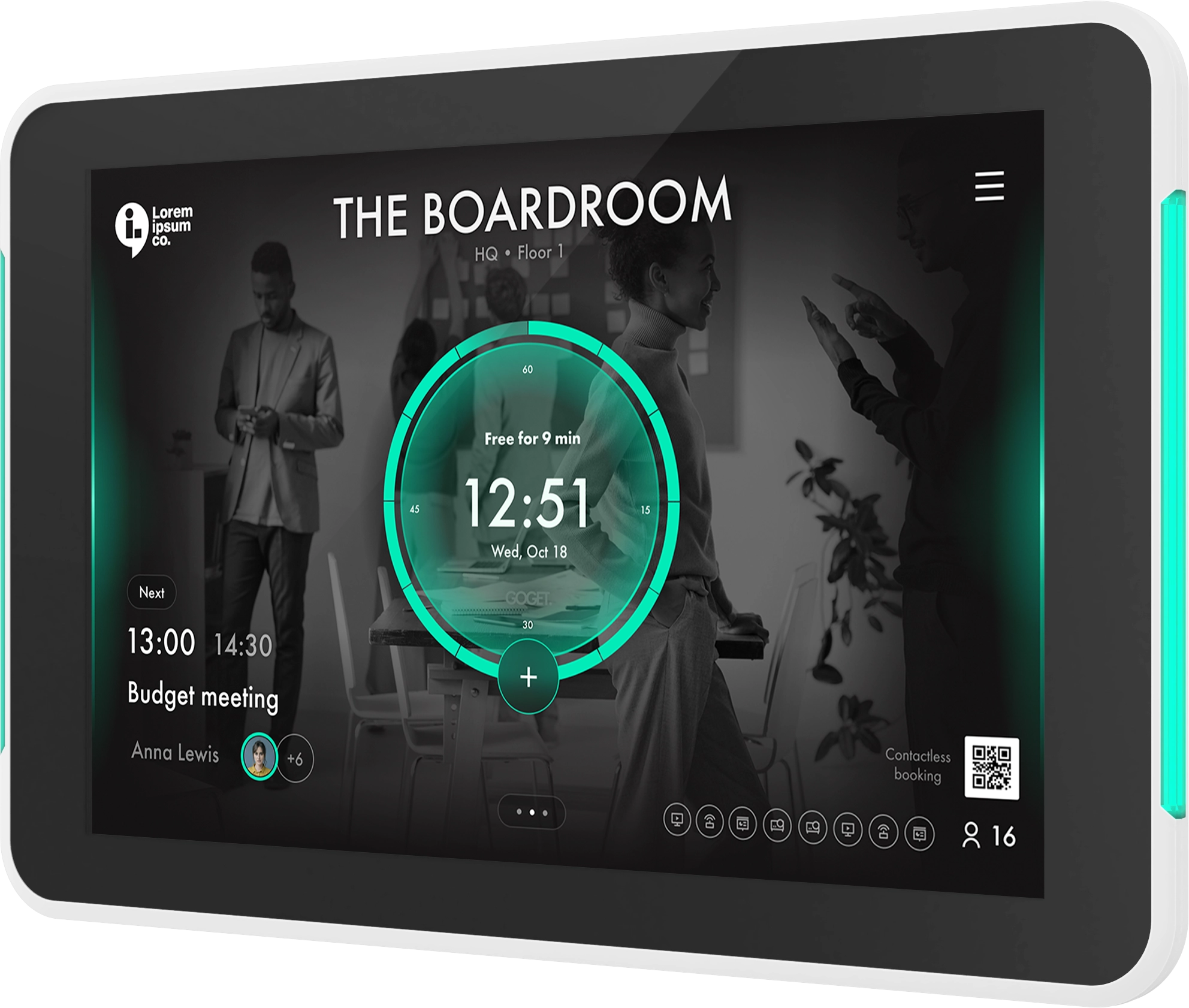
A room schedule device is a dedicated display installed outside or near a meeting room to show room availability, meeting schedules, and booking options.
In most workplaces, these devices are used to:
- Show whether a room is free, booked, or occupied
- Display the current and upcoming room schedule
- Let employees book a room directly at the door
- Support meeting check-in workflows
- Release rooms when meetings are not attended
- Help employees find nearby available rooms
- Improve visibility across shared meeting spaces
Some organizations use consumer tablets for this purpose. Others choose professional-grade display hardware from major vendors, including GOGET.
The right choice depends on the organization’s workplace model, IT standards, security requirements, and expected deployment scale.
Why the Choice of Meeting Room Display Hardware Matters for IT & Facilities Teams
These systems are not one-off accessories. Once deployed, they become part of the workplace infrastructure.
If the hardware is difficult to mount, hard to manage remotely, unreliable on the network, or dependent on manual maintenance, it can become another support burden for IT/Facilities. If it works well, it can reduce booking friction, improve room visibility, and create a more predictable workplace experience.
For IT & Facilities teams, the hardware decision affects:
- Deployment consistency across rooms, floors, and offices
- Network and security alignment with internal IT policies
- Support workload for updates, troubleshooting, and replacements
- Employee experience when booking or finding rooms
- Facilities coordination around mounting, cabling, and power
- Total cost of ownership over the full device lifecycle
This is why meeting room display hardware should be evaluated as operational infrastructure, not simply as a screen.
Key Considerations When Choosing Display Hardware
1. Purpose-built display or consumer tablet
The first decision is whether to use consumer tablets or purpose-built display hardware.
Consumer tablets can be attractive because they are familiar, widely available, and often inexpensive upfront. For a small office or a short-term pilot, they may be enough.
However, IT teams should evaluate whether tablets are suitable for fixed, long-term workplace use. Common areas to review include:
- Continuous operation during office hours
- Device lockdown and app control
- Mounting stability and cable management
- Long-term model availability
- Replacement planning
- Remote administration
- Power and network reliability
- Support for professional installation
Professional displays are usually designed specifically for fixed installation outside meeting rooms. Products in this category often focus on mounting, visibility, remote management, and compatibility with room booking or scheduling software.
GOGET One follows this purpose-built approach. It is positioned as a professional meeting room display rather than a generic tablet, with hardware and software designed to work together for room booking use cases.
The practical question for IT is not simply “tablet or display?” The better question is: Which option will be easier to deploy, secure, support, and scale over several years?
For deeper insights around this, please see our article Professional Meeting Room Display vs. Tablet.
2. Operating system and lifecycle support
The operating system matters because it affects app compatibility, security, device management, and long-term support.
When evaluating room booking solutions, IT teams should ask:
- Which operating system does the device run?
- Is the OS version current and supportable?
- How are updates handled?
- Can the device be locked down for a single-purpose scheduling use case?
- What happens when the hardware reaches end of life?
- Can the same model be purchased consistently over time?
This is especially important for multi-office deployments. If each office uses different hardware or different OS versions, support and troubleshooting become more complex.
GOGET One Gen 2 runs Android 14 and is designed as dedicated workplace display hardware for GOGET’s room booking platform.
3. Power: PoE, AC power, and installation complexity
Power is one of the most important practical considerations in a room schedule display rollout.
For professional installations, Power over Ethernet, or PoE, is often preferred because it can simplify cabling. A single cable can support both network connectivity and power, depending on the device and infrastructure.
IT and facilities teams should review:
- Whether PoE or PoE+ is supported
- Whether AC power is also available
- Where cables will be routed
- Whether power adapters will be visible
- Whether installation is suitable for glass walls, drywall, mullions, or other surfaces
- Whether network switches have sufficient PoE budget
GOGET One supports PoE+ as standard, with AC power also available.
For IT teams, PoE support is not only a convenience. It can reduce visible cabling, simplify installation standards, and make larger rollouts easier to plan.
4. Wired Ethernet, Wi-Fi, and enterprise authentication
Network design should be reviewed early. A conference room display needs reliable connectivity to show accurate room status and interact with booking systems.
Key questions include:
- Should the display use wired Ethernet or Wi-Fi?
- Is enterprise Wi-Fi authentication required?
- Is IEEE 802.1X needed on LAN?
- Will displays be placed on a dedicated VLAN?
- What firewall rules are required?
- How should the device behave during temporary network interruptions?
- Who owns network troubleshooting: IT, AV, facilities, or the vendor?
Wired Ethernet is often preferred for reliability, especially when PoE is used. Wi-Fi may be suitable where cabling is difficult, but it should be evaluated against the organization’s authentication and security policies.
For GOGET One, we have chosen to support IEEE 802.1X LAN and Wi-Fi with enterprise authentication.
5. Mounting, visibility, and physical installation
Hardware selection should involve both IT and facilities. The display must work technically, but it also needs to fit the building.
Review installation requirements such as:
- Wall mounting
- Glass mounting
- Mullion mounting
- Portrait or landscape orientation
- Cable routing
- Accessibility and reachable height
- Visibility from corridors
- Device thickness and physical footprint
- Whether LED indicators are visible from different angles
This matters because meeting room displays are used in high-traffic areas. Employees often need to understand room status at a glance, sometimes while walking past the room.
GOGET One includes signature LED light bars visible from the front and sides, an integrated wrap-around mount, support for landscape and portrait orientation, and glass-mounting support.
6. Remote device management
For IT teams, remote management is one of the biggest differences between a manageable deployment and a support-heavy deployment.
A single device can be maintained manually. Dozens or hundreds of displays cannot.
Before selecting hardware, review whether admins can:
- Provision devices remotely
- Monitor device status
- Update software
- Reboot or troubleshoot devices
- Apply settings consistently
- Manage rooms centrally
- Replace hardware without rebuilding the setup from scratch
Remote device management becomes especially important for distributed offices, hybrid workplaces, and organizations with lean IT teams.
GOGET One supports remote device management through the Goget Web Dashboard.
7. Room sensors and occupancy signals
Some organizations want more than calendar-based room status. They also want to understand whether booked rooms are actually being used.
This is where occupancy sensors can become relevant.
A sensor can provide an additional signal about whether a room appears to be in use. This can help workplace teams understand the difference between scheduled usage and real-world usage.
For IT and workplace teams, sensor-related questions include:
- Does the device support sensor communication?
- Is a separate gateway required?
- How are sensors paired or provisioned?
- How is sensor health monitored?
- How are battery levels shown?
- What workflows use the sensor signal?
- Is the sensor detecting presence, not identifying people?
- How are privacy expectations handled?
GOGET’s room sensor solution uses BLE sensors that communicate directly with an assigned GOGET One. The setup does not require separate gateways, hubs, extra servers, extra wiring, programming, or third-party services.
8. Security and privacy
Room schedule displays interact with calendar systems, workplace data, and sometimes occupancy signals. Security and privacy should therefore be part of the hardware evaluation.
IT teams should review:
- What calendar information is shown on the display
- How authentication and authorization are handled
- Whether the device supports enterprise network policies
- Whether the device can be locked down
- How software updates are delivered
- What data is stored locally
GOGET’s platform positioning includes privacy-conscious architecture.
9. Total cost of ownership
The lowest upfront hardware price is not always the lowest long-term cost.
For IT teams, total cost of ownership should include:
- Hardware purchase price
- Mounting accessories
- Installation labor
- Cabling and PoE infrastructure
- Device management effort
- Replacement planning
- Support tickets
- Downtime and troubleshooting
- Compatibility with future workplace software needs
A consumer tablet may cost less at the start, but require more effort around mounting, power, management, replacement, or app lockdown. Purpose-built display hardware may cost more upfront, but reduce operational friction if it is easier to install, manage, and support.
The right decision depends on scale. A small office with a few rooms may have different requirements from a global organization standardizing display hardware across many sites.
Room Schedule Display Hardware Evaluation Checklist
Use this checklist when comparing display hardware for your workplace.
Hardware and installation
- Is the device designed for fixed workplace installation?
- Does it support wall, glass, or mullion mounting?
- Can it be installed in portrait and landscape if needed?
- Are cables easy to hide or route cleanly?
- Are room-status indicators visible from the corridor?
- Is the screen size suitable for viewing meeting details?
Power and network
- Does the device support PoE or PoE+?
- Is AC power available if needed?
- Does it support wired Ethernet?
- Does it support enterprise Wi-Fi?
- Does it support IEEE 802.1X if required?
- Can it fit into the organization’s VLAN and firewall model?
Operating system and security
- Is the OS version current?
- Is the device suitable for single-purpose use?
- Can the device be locked down?
- How are updates managed?
- What is the expected lifecycle of the hardware?
- Is the model likely to remain available for future expansion?
Management and support
- Can IT manage the display remotely?
- Can settings be applied centrally?
- Can devices be monitored?
- Can troubleshooting be done without visiting the room?
- Is replacement straightforward?
- Is support available from the vendor or partner?
Sensor and analytics readiness
- Can the hardware work with occupancy sensors?
- Is a separate hub or gateway required?
- Can admins monitor sensor health and battery status?
- Are sensor workflows configurable?
- Is the sensor signal anonymous and privacy-conscious?
- Can room usage data support workplace planning?
Common Mistakes When Selecting Room Schedule Display Hardware
Choosing based only on upfront cost
A lower-cost device can become expensive if it needs more support, more manual maintenance, or frequent replacement. IT teams should compare the full lifecycle cost, not only the purchase price.
Treating mounting as an afterthought
Mounting affects user experience, installation time, cable visibility, and long-term reliability. It should be reviewed before hardware is selected.
Ignoring network requirements until deployment
Network authentication, firewall rules, VLANs, and PoE capacity should be planned before devices arrive on site.
Underestimating remote management
Manual management may work for a pilot. It rarely works well at scale. Remote administration should be a core requirement for multi-room or multi-site deployments.
Separating hardware from software decisions
Room schedule display hardware and room booking software need to work together. Evaluate the complete workflow: booking, check-in, release, room status, administration, and support.
Overlooking employee behavior
Employees use meeting rooms in real-world ways. They walk up to rooms, make last-minute changes, forget to check in, leave early, or need to find alternatives quickly. The hardware should support these everyday patterns.
Where GOGET One fits
GOGET One is GOGET’s purpose-built room schedule display hardware, designed to work with GOGET’s room booking software and broader workspace platform.
It is relevant for IT teams that want a dedicated room display rather than a generic tablet, especially where the organization needs:
- Integrated room booking hardware and software
- PoE+ support
- Remote device management
- Microsoft 365 and Google Workspace support
- Room check-in and no-show release workflows
- Visible room-status indicators
- Support for landscape and portrait installation
- Compatibility with GOGET’s room sensors and workspace insights
GOGET One should not be evaluated only as a screen. It is part of a broader workplace system that includes room booking, desk booking, wayfinding, maps, space management, insights, and room-presence signals.
For IT teams, that integrated approach can reduce the number of separate components that need to be evaluated, configured, and supported.
Final Thoughts
Choosing conference room display hardware is a practical IT decision with long-term workplace impact.
The right hardware should be reliable, secure, easy to install, simple to manage, and aligned with the organization’s booking workflows. It should also support the way employees actually use meeting rooms: checking availability, booking quickly, finding alternatives, and avoiding unnecessary scheduling friction.
Whether your shortlist includes GOGET One or another professional room display option, the best choice is the one that fits your IT standards, workplace operations, and long-term support model.
Ready to choose room schedule display hardware that fits your IT standards?
Explore GOGET One or book a demo and see how purpose-built meeting room displays, room booking software, occupancy sensors, maps, and workplace insights work together in one connected platform.