Table of Contents
- Why cross-tenant meeting room booking gets complicated
- What are the alternatives for Microsoft 365 cross-tenant room booking?
- A simpler approach: keep Microsoft 365 separate and synchronize the rooms
- Simple for Microsoft 365 administrators
- Even simpler for employees: nothing changes
- What happens when someone books the room?
- What if more than two organizations share the rooms?
- What about Google Workspace?
- One physical room, without merging your Microsoft 365 environments
Two companies can share the same office, the same reception and the same meeting rooms while still operating completely separate Microsoft 365 environments.
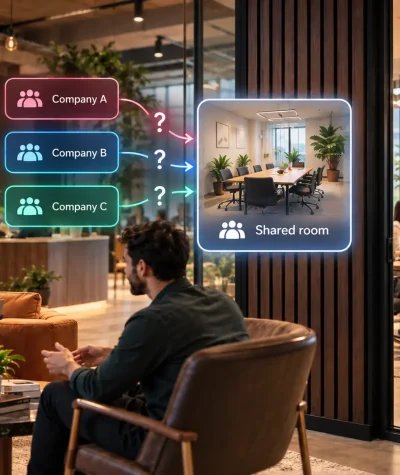
That creates a surprisingly difficult room-booking problem.
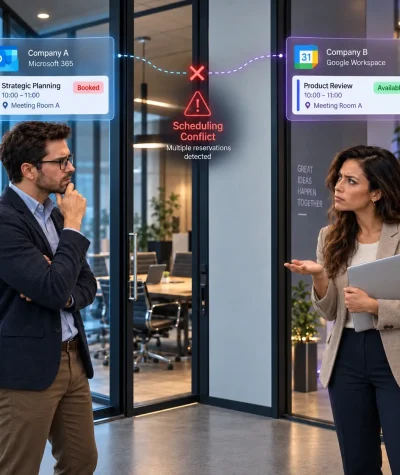
A meeting room that looks available in Company A’s Outlook can already be booked by someone in Company B. The physical room is shared, but the Microsoft 365 room calendars are not.
There are Microsoft-native ways to make resources more accessible across tenants, but they often introduce either booking limitations, additional security exposure or considerable cross-tenant administration.
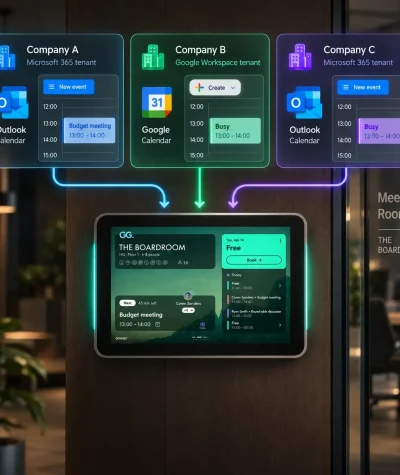
For organizations that simply want to share meeting rooms between separate Microsoft 365 tenants, there is a simpler approach: let every organization keep its own room resource and its normal Outlook workflow, while GOGET synchronizes the room bookings between them.
Employees keep booking exactly as they do today. The synchronization happens behind the scenes.
Why cross-tenant meeting room booking gets complicated
Within one Microsoft 365 tenant, room booking is straightforward. A meeting room is represented by a room mailbox, and employees can find and reserve it through Outlook and other Microsoft 365 booking experiences.
The problem starts when one physical room must belong to two separate booking environments.
Imagine that Company A and Company B share a room called Stockholm. Company A has its own Stockholm room resource, while Company B has another room resource for the same physical space.
If those calendars are independent, Company A can book Stockholm from 10:00 to 11:00 while Company B’s calendar still shows the room as available.
Simply sharing free/busy information does not fully solve this problem. What is needed is a way to make separate room calendars consistently represent the availability of one physical room.
What are the alternatives for Microsoft 365 cross-tenant room booking?
There are several possible approaches, but they solve different problems.
| Approach | Main issue for shared meeting rooms |
|---|---|
| Allow external users to book one tenant’s room mailbox | Limited booking experience for external users, with a risk of unwanted bookings if external requests are accepted without restrictions on who can book |
| Share free/busy information | Helps users see availability but does not itself synchronize separate room resources |
| Microsoft Multi-Tenant Organization | Creates deeper cross-tenant relationships and currently involves a comparatively complex, preview-stage room-sharing configuration |
| GOGET Cross-Organization Shared Room Calendars | Keeps each organization’s room resource and synchronizes their availability around the same physical room |
Option 1: Allow external users to book one tenant’s room mailbox
Microsoft 365 can be configured so that a room mailbox processes meeting requests from external senders using ProcessExternalMeetingMessages.
This works, but it means external users need to book a resource belonging to another organization rather than simply using their own internal room resource. Outlook Room Finder also does not work normally for external users in this setup.
There is also a security consideration. Microsoft states that enabling this setting allows users outside the organization to book the room. If the room is configured for automatic processing, an external sender who discovers or guesses the room mailbox address can potentially submit reservation requests that occupy its calendar.
Microsoft describes this risk as minimal because outsiders are unlikely to know the room address, but organizations should still recognize that the configuration deliberately expands who can send requests that the room processes.
For occasional external bookings, that may be acceptable. It is less elegant when two organizations share rooms every day.
Option 2: Microsoft Multi-Tenant Organization
Microsoft’s Multi-Tenant Organization, or MTO, is designed for organizations that deliberately want closer collaboration between Microsoft 365 tenants.
That is a much broader architectural decision than simply sharing a few meeting rooms.
Microsoft describes the MTO model as involving a high level of trust between participating tenants. It can include cross-tenant access relationships and synchronization of users between environments.
For genuinely related tenants within the same corporate organization, that can make sense.
But two independent companies sharing an office may specifically not want that kind of Microsoft 365 co-dependency. A landlord and its tenants, partner companies, subsidiaries with deliberately separated IT environments or companies in a shared workspace may want their identities, users and Microsoft 365 administration to remain independent.
Microsoft’s newer cross-tenant room discovery capability does not currently make MTO a simple alternative for this use case either. Microsoft’s documentation describes it as preview functionality and requires cross-tenant synchronization, room-attribute synchronization, booking-response configuration and free/busy sharing.
If your only requirement is “Company A and Company B need to book the same rooms,” that can be considerably more infrastructure and organizational dependency than the problem calls for.
A simpler approach: keep Microsoft 365 separate and synchronize the rooms
GOGET Cross-Organization Shared Room Calendars takes a different approach.
Each organization keeps its own Microsoft 365 environment and its own room resource.
For example:
Physical room: Stockholm
- Company A has
stockholm@companya.com - Company B has
stockholm@companyb.com
GOGET connects both room calendars to the same physical meeting room. When Company A books Stockholm, GOGET mirrors the reservation into Company B’s room calendar so the same timeslot becomes unavailable there. When Company B books it, the reverse happens.
There is no need to turn the two organizations into one Microsoft Multi-Tenant Organization simply to coordinate a room.
Simple for Microsoft 365 administrators
The difference becomes particularly clear during configuration.
Once the participating Microsoft 365 calendar integrations and room resources are available in GOGET, the administrator selects the physical room, assigns its main room calendar, adds the corresponding room calendar from the other organization and saves the configuration. Additional organizations can be added in the same way.
In practical terms, the room-linking workflow is:
- Connect each organization’s supported calendar environment to GOGET.
- Select the shared physical meeting room.
- Assign its main room resource and add the matching cross-organization room resource or resources.
- Save the configuration.
There is no MTO to establish between the companies just for the room-sharing use case, no need to synchronize their employee populations simply to make the room available, and no requirement for employees to understand how the synchronization works.
GOGET handles the coordination between the room calendars.
Even simpler for employees: nothing changes
The biggest advantage may be that employees do not need to learn a new booking process.
A Company A employee continues booking the room from Company A’s normal Outlook or Teams environment.
A Company B employee continues booking through Company B’s environment.
They do not have to switch tenants. They do not need to remember another company’s room email address. They do not need to open a special cross-company booking portal just because the meeting room happens to be shared.
GOGET’s Cross-Organization Shared Room Calendars allow employees to continue booking through their own Outlook or Teams workflow without changing how they make reservations.
That is the central idea behind the solution:
Keep the complexity away from the employee.
From the user’s perspective, the shared meeting room behaves much more like a normal room in their own organization.
What happens when someone books the room?
Suppose an employee in Company A reserves Stockholm from 14:00 to 15:00.
The reservation is created through Company A’s normal calendar workflow. GOGET then reflects that reservation in the other room calendars linked to the same physical room.
Company B’s room resource is therefore also unavailable from 14:00 to 15:00.
Mirrored reservations are marked private by default so another organization does not need to receive the original meeting information simply to know that the room is occupied. GOGET recommends keeping this privacy setting enabled when meeting details should not be shared between organizations.
The employee just sees that the room is busy.
What if more than two organizations share the rooms?
The same model can extend beyond two organizations.
A coworking environment, shared headquarters or multi-company office can connect additional room calendars representing the same physical room.
GOGET then keeps availability synchronized across those linked calendars.
This makes the approach relevant for scenarios such as corporate groups, newly acquired companies, independent companies sharing an office, landlords providing common meeting rooms, project offices and innovation hubs.
What about Google Workspace?
Although this article focuses on Microsoft 365 and Outlook, GOGET Cross-Organization Shared Room Calendars also supports Google Workspace room calendars.
A shared room can therefore include Microsoft 365 resources, Google Workspace resources, or a combination of the two supported environments.
One physical room, without merging your Microsoft 365 environments
The underlying problem is simple: several organizations use the same physical meeting room, but their calendars live in separate systems.
Solving that problem should not necessarily require the organizations to become tightly connected at the Microsoft 365 identity and tenant level.
With GOGET Cross-Organization Shared Room Calendars, each organization can retain its own Microsoft 365 room resource and familiar Outlook or Teams booking workflow while GOGET keeps the shared room’s availability synchronized between them.
For administrators, that means a focused room-calendar configuration rather than building a wider cross-tenant collaboration architecture just to share meeting spaces.
For employees, it is even simpler:
Open Outlook. Schedule the meeting. Select the room.
Just as they always have.
GOGET handles the cross-organization synchronization in the background.