Table of Contents
- What is a Room Presence Sensor?
- Why Sensor Technology Matters
- PIR Sensors
- Radar-Based Sensors
- Camera-Based and Optical Occupancy Sensors
- Motion-Based Room Sensors and Booking Systems
- Sensor Integration Platforms
- PIR vs Radar vs Camera-Based Sensors: Quick Comparison
- How to Choose the Right Room Presence Sensor
- Privacy Questions to Ask Before Choosing a Sensor
- Infrastructure Questions to Ask Before Deployment
- Where GOGET Room Sensors Fit
- Key Takeaways for IT and Facilities Teams
- Final Thoughts
What is a Room Presence Sensor?
A room presence sensor is a sensor that helps detect whether a space appears to be occupied. In a workplace setting, these sensors are often used in meeting rooms, focus rooms, phone booths, collaboration areas, and other shared spaces.
The simplest and most common use case is live room status: is the room in use or not? For many organizations, this room-level presence signal is enough to improve booking workflows, reduce unused reservations, and make room availability easier to trust.
Some sensor systems go further and try to estimate headcount, support environmental monitoring, or provide more advanced space analytics. These capabilities can be useful in specific cases, but they can also add cost, infrastructure, privacy review, and IT complexity. For meeting room booking, the practical question is often not “which sensor is most advanced?” but “which sensor gives us the right signal without making the solution harder to manage?”
A sensor solution is usually connected to a broader workplace system, such as:
- a room booking platform
- a meeting room display
- a workplace analytics dashboard
- an interactive office map
- a building or facilities management system
The sensor itself does not solve the whole workflow. The value comes from how the sensor signal is interpreted and used.
Why Sensor Technology Matters
Different room presence sensor technologies are designed for different levels of detail.
Some sensors answer a simple question: is there presence or movement in the room? Others can estimate or count how many people are present. Some include environmental data such as temperature, humidity, CO₂, or air quality. Some rely on local room hardware, while others require gateways, additional cloud integrations, separate network infrastructure, or third-party sensor platforms.
For IT and Facilities teams, this difference matters because added sensor detail often comes with added operational burden. Radar and camera-based systems may offer more granular data, but for many meeting room booking use cases the extra benefit can be marginal compared with a simpler PIR presence sensor.
This matters for five practical reasons.
1. The data is different
A PIR sensor may indicate presence or movement, but it should not normally be described as people-counting. Radar, optical, or depth-based systems may support more detailed occupancy analytics depending on the vendor and implementation, but that additional data is not always necessary for meeting room booking.
In many cases, booking platforms already provide useful attendee context through meeting invitations, accepted attendees, room capacity, check-ins, no-shows, and utilization patterns. That does not replace physical people counting in every scenario, but it often gives workplace teams enough information to make practical decisions without adding a more expensive sensor layer.
2. The privacy model is different
A simple presence signal is usually easier to explain to employees than a camera-based system. Camera-based and optical systems can be designed with privacy safeguards, but they often require more careful evaluation, employee communication, legal review, works council involvement, and documentation.
For many organizations, this added privacy process is difficult to justify if the main goal is simply to understand whether a meeting room appears to be in use.
3. The infrastructure is different
Some solutions require gateways, integrations, service licenses, third-party sensor networks, additional cloud services, or dedicated network infrastructure. Others connect directly to the local room display or booking device.
This affects installation, troubleshooting, ownership, long-term support, and IT workload. A sensor solution that requires separate infrastructure may be appropriate for a large smart-building program, but it can be unnecessarily complex for standard meeting room booking automation.
4. The workflow is different
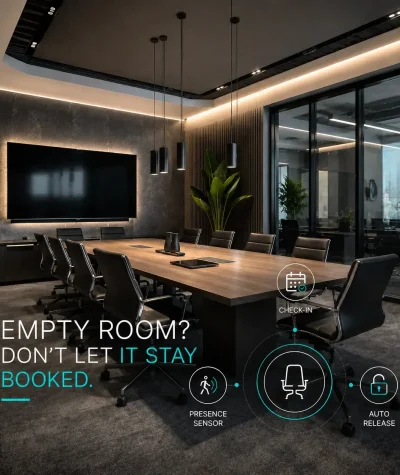
A room presence sensor can support different workflows, such as auto-booking, assisted check-in, automatic release, live occupancy maps, or analytics.
For many meeting rooms, the most valuable workflows are straightforward: confirm whether a booked room is in use, release unused rooms when configured, and improve room availability data. These workflows usually do not require radar or camera-based sensing.
5. The buying decision is different
The “best” sensor solution depends on what the organization needs. A small meeting room that only needs a room-level presence signal is different from a corporate real estate team trying to measure detailed occupancy across a large campus.
For most room booking projects, simplicity should be a major buying criterion. A more advanced sensor can add significant cost and management complexity while delivering only marginal additional value if the core use case is meeting room availability.
PIR Sensors
PIR stands for passive infrared. A PIR sensor detects changes in infrared energy, which can indicate motion or presence in a space.
PIR sensors are commonly used in offices because they are compact, relatively simple, and well suited for room-level occupancy workflows. They are often used in meeting rooms, phone booths, huddle rooms, and other spaces where the main question is whether the room appears to be in use.
GOGET’s occupancy sensor is listed as an infrared presence sensor with PIR technology, a presence detection range of up to 5 meters, BLE communication, and battery-powered operation. It is designed as part of the GOGET room booking ecosystem, not as a standalone people-counting product.
Pros of PIR sensors
PIR sensors are often a good fit when the organization needs a practical room-level signal rather than detailed people-counting data.
Common advantages include:
- simple presence or motion detection
- compact hardware
- low power consumption
- battery-powered installation options
- lower privacy sensitivity than camera-based systems
- strong fit for meeting room booking workflows
- useful for no-show and room-release scenarios when configured correctly
- lower operational complexity compared with many radar or camera-based setups
For many meeting rooms, a PIR sensor is enough to answer the operational question: does this room appear to be in use?
Cons of PIR sensors
PIR sensors also have limitations.
They do not normally identify people, count attendees, or understand meeting behavior. They may be affected by placement, room shape, glass walls, heat sources, sunlight, HVAC airflow, or people sitting still for long periods.
A PIR sensor should therefore be treated as one input in a room booking workflow, not as a perfect source of truth. The signal may need to be combined with booking status, check-in rules, room display interactions, and time thresholds.
For many office teams, this is an acceptable tradeoff. The sensor provides the practical presence signal needed for room booking without the cost, privacy sensitivity, and infrastructure demands of more complex sensor systems.
When PIR sensors are a good fit
PIR sensors are often suitable for:
- meeting rooms
- small collaboration rooms
- focus rooms
- phone booths
- rooms where privacy expectations are high
- deployments where simple installation matters
- room booking workflows that need presence, not headcount
- organizations that want to avoid separate sensor network infrastructure
A PIR sensor is usually a practical choice when the goal is to improve room availability, reduce unused bookings, and make booking data more realistic without introducing more complex sensing infrastructure.
Radar-based Sensors
Radar-based occupancy sensors use radio-wave sensing to detect presence, movement, or in some cases count people, depending on the sensor and vendor implementation.
Radar can support more detailed sensing than basic motion detection in some products. However, it is important to separate what is technically possible from what is actually needed for a meeting room booking workflow. In many cases, the added data from radar does not justify the higher cost, vendor-specific setup, licensing, or infrastructure requirements.
Some vendors position radar-based sensors around real-time occupancy, anonymous people counting, environmental sensing, and broader workplace utilization analysis. The exact capabilities vary by product, so buyers should verify what the sensor actually detects before making assumptions.
Pros of radar-based sensors
Radar-based sensors may be useful in specific cases where a workplace team needs more detailed sensing than a basic room-level presence signal.
Potential advantages can include:
- detection of subtle presence, depending on product design
- possible people-counting support in some systems
- no traditional camera image
- possible environmental sensing when combined with other sensor capabilities
These capabilities may be relevant for analytics-heavy workplace programs, but they are often more than what is needed for standard meeting room booking.
Cons of radar-based sensors
Radar-based systems can add significant cost and complexity compared with simple PIR sensors. They may require vendor-specific devices, licenses, integrations, gateways, additional network planning, or separate platform dependencies.
The word “radar” also does not automatically mean the same thing across all products. Some radar sensors are designed for presence detection, while others are designed for people counting or broader space analytics. Buyers should ask exactly what the sensor measures, how it connects, and how much IT work is required to deploy and maintain it.
For many meeting room booking scenarios, radar may provide only marginal benefits compared with PIR while increasing procurement cost, setup complexity, troubleshooting effort, and long-term administrative overhead.
When radar-based sensors are a good fit
Radar-based sensors may be worth considering when:
- physical people counting is a confirmed business requirement
- room-level presence is not detailed enough
- environmental data is part of a broader workplace analytics program
- the organization has budget and IT capacity for a more advanced sensor layer
- the vendor platform supports the desired integrations and automations
Radar can be useful in selected cases, but it should be evaluated against the organization’s actual workflow needs, cost tolerance, and ability to manage additional infrastructure.
Camera-based and Optical Occupancy Sensors
Camera-based, optical, depth, or computer-vision occupancy sensors are used when organizations want more detailed information than a simple presence signal. Depending on the system, these solutions may support people counting, zone-level occupancy, dwell patterns, or more advanced utilization analytics.
However, camera-based and optical systems are usually the most complex option for meeting room occupancy sensing. They can add significant hardware cost, privacy review, IT involvement, network requirements, data-processing questions, and employee communication needs.
For many meeting rooms, this level of sensing may be unnecessary. If the goal is to improve room availability, support check-in, and release unused rooms, a simpler PIR sensor can often provide the needed presence signal with much less operational burden.
Pros of camera-based or optical systems
Camera-based or optical systems can provide more detailed analytics than simple presence sensors, but those benefits are most relevant in specific workplace analytics or corporate real estate scenarios.
Potential advantages can include:
- people counting in some systems
- zone-level utilization data
- more detailed space planning data
- support for large offices or complex real estate portfolios
For most meeting room booking workflows, these benefits may be limited. Many organizations can already get useful attendee and capacity context from their booking platform, such as invited attendees, accepted attendees, room capacity, check-ins, no-shows, and reservation patterns.
Cons of camera-based or optical systems
The biggest challenge is privacy perception. Even when a system is designed to be anonymous, employees may still react differently to a sensor that appears camera-like compared with a small PIR sensor.
Camera-based systems may also require more planning around:
- employee communication
- legal and works council review
- data retention
- security documentation
- installation location
- network requirements
- processing architecture
- vendor due diligence
- IT ownership and long-term maintenance
- additional hardware, licensing, or cloud-service costs
They may also be more than what is needed for basic room booking automation. For many organizations, the extra cost and complexity are difficult to justify if the primary use case is simply to know whether a meeting room appears occupied.
When camera-based or optical systems are a good fit
Camera-based or optical systems may be appropriate when:
- physical people-counting accuracy is a confirmed requirement
- the organization needs detailed space utilization analytics beyond room-level presence
- the deployment covers large floors or portfolios
- privacy and legal reviews can be handled properly
- the vendor can clearly explain how data is processed and protected
- the budget supports a more advanced analytics program
They are less likely to be necessary when the primary goal is simple, reliable meeting room presence detection.
Motion-based Room Sensors and Booking Systems
Some workplace booking vendors describe their room sensors as motion-based. In these systems, sensor data can help determine whether a booked room should remain occupied, be released, or show as unavailable when someone enters without a formal booking.
This type of workflow is easy to understand. If people are detected, the room appears occupied. If people are not detected after a defined time, the system may release or update the room status.
The main advantage is operational clarity. Motion-based sensors can be a useful way to reduce room-booking friction and make room availability more realistic.
The limitation is that motion is not always the same as occupancy. People may sit still, rooms may have unusual layouts, and placement can affect detection. This is why sensor data should normally be combined with booking rules, check-in behavior, and admin settings.
For many meeting room booking use cases, this combination is still more practical than deploying more expensive radar or camera-based systems that require additional infrastructure and management.
Sensor Integration Platforms
Some vendors focus less on one specific type of sensor and more on a sensor integration layer. In this model, a workplace platform may connect third-party sensors into a broader ecosystem for occupancy, environmental data, automation, and workplace intelligence.
This type of model can be flexible because it allows organizations to connect different sensor vendors or technologies. It can also support broader workplace intelligence use cases beyond room booking.
The tradeoff is that the deployment may involve more components, compatibility checks, integration planning, gateways, subscriptions, and IT ownership. For some organizations, that flexibility is valuable. For others, especially those focused on meeting room booking, a simpler integrated display-and-sensor model may be easier to manage and more cost-effective.
PIR vs Radar vs Camera-based Sensors: Quick Comparison
| Sensor type | Best for | Strengths | Limitations |
|---|---|---|---|
| PIR sensor | Meeting rooms, huddle rooms, phone booths, room booking workflows | Compact, practical, privacy-friendly presence signal, low power, often easier to deploy | Does not normally count people, placement matters, limited detail |
| Radar-based sensor | Specialized cases where richer sensing or confirmed head count is required | May detect subtle presence and may support richer data in some systems | Higher cost, more complex setup, product capabilities vary, may require licenses, integrations, gateways, or additional network infrastructure |
| Camera-based / optical sensor | Detailed occupancy analytics and physical people counting where this is a confirmed requirement | Can support richer utilization data and people count in some systems | Significant privacy review, higher cost, higher IT complexity, additional network and data-processing requirements, often unnecessary for basic room booking |
| Sensor integration platform | Multi-sensor smart office programs | Flexible, can combine occupancy and environmental signals | More integration planning, more components to manage, may depend on third-party sensors, gateways, subscriptions, and compatibility |
How to Choose the Right Room Presence sensor
The choice of presence sensor should start with the business problem, not the technology.
Choose PIR when you need a practical room-level presence signal
A PIR sensor is often the right choice when the main goal is to understand whether a meeting room appears to be in use. It is especially useful when the organization wants to support booking workflows such as assisted check-in, automatic release, or clearer room availability.
This is also the most natural fit when privacy expectations are high, people-counting is not required, and the organization wants to avoid unnecessary infrastructure complexity.
Be cautious with radar unless the extra data is clearly needed
Radar may be relevant when the organization has a confirmed need for richer presence detection or physical head count without using a traditional camera. However, radar systems often add cost, licensing, setup complexity, and vendor-specific infrastructure.
For many meeting room booking workflows, the practical benefit of radar over PIR may be limited. Buyers should verify that the added data will actually change decisions or improve workflows enough to justify the added cost and IT effort.
Use camera-based or optical systems only when people counting is a real requirement
If the goal is detailed space analytics, physical people counting, or zone-level utilization, a camera-based, depth-based, or optical system may be worth evaluating.
However, this type of solution is usually more relevant for corporate real estate analytics or large office portfolio planning than for standard room booking automation. If the main goal is to understand whether a room is in use, camera-based sensing can be an expensive and complex way to solve a simpler problem.
In many cases, booking platforms can already provide useful attendee context through invited attendees, accepted attendees, room capacity, check-ins, no-shows, and booking patterns. This may be enough for practical room planning without physical people-counting sensors.
Choose an integrated display-and-sensor model when simplicity matters
For meeting room booking specifically, the most practical setup is often the one that connects the occupancy sensor directly to the room booking workflow.
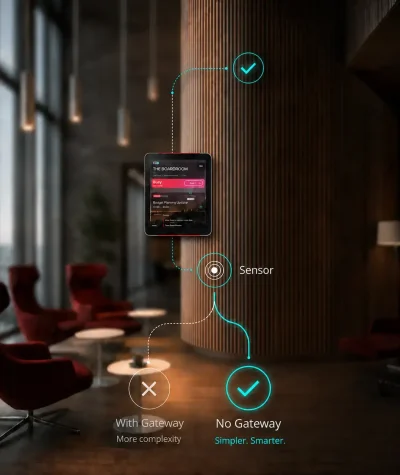
This is where GOGET’s approach is different. GOGET Room Sensors are designed to communicate directly with an assigned GOGET One meeting room display via BLE, without separate gateways, hubs, extra servers, extra wiring, programming, or third-party services.
For IT and Facilities teams, that reduces the number of moving parts. The room display is already part of the room booking experience, so using it as the local connection point for the sensor can make the deployment easier to understand and maintain.
Privacy Questions to Ask Before Choosing a Sensor
Privacy should be part of the buying process from the beginning.
A room presence sensor may be used for practical workplace improvements, but employees still need to understand what is being measured and why. The more detailed the sensor data, the more important this communication becomes.
This is one reason to keep the sensor model as simple as the use case allows. A PIR presence signal is usually easier to explain than radar-based people counting or camera-based analytics.
Before choosing a sensor, ask:
- Does the sensor detect presence, movement, head count, or identity?
- Does it capture images, video, sound, device identifiers, or personal data?
- Is data processed locally, in the cloud, or through a third-party platform?
- What data is stored, and for how long?
- Can the data be used to identify individuals?
- How will the organization explain the system to employees and visitors?
- Who can access the data?
- What administrative controls are available?
For GOGET’s PIR occupancy sensor positioning, the safe distinction is clear: it should be framed as detecting presence or movement, not as people-counting, identity tracking, camera-based monitoring, or employee surveillance.
Infrastructure Questions to Ask Before Deployment
A room presence sensor project can become more complex than expected if the infrastructure is not evaluated early.
This is especially important when comparing PIR sensors with radar or camera-based solutions. More advanced sensing may require additional devices, separate gateways, network planning, cloud services, licensing, or integration work. These requirements can increase both upfront cost and long-term IT workload.
Before choosing a vendor, ask:
- Does each sensor require a gateway?
- Does the system require separate hubs?
- Does it need extra wiring?
- Does it depend on third-party cloud services?
- Does it require separate network infrastructure?
- How is the sensor provisioned?
- How are battery levels monitored?
- How are sensor health and errors reported?
- Can settings be managed centrally?
- What happens if the room display or sensor disconnects?
- Does the system support different rules for different rooms?
These questions matter because room sensors are not only hardware. They become part of the operational workflow for IT, Facilities, and workplace teams.
GOGET’s room sensor setup is designed around a simpler architecture: battery-powered, wire-free sensors communicate directly with assigned GOGET One displays via BLE, while sensor behavior, automation, and telemetry are managed through the admin portal.
Where GOGET Room Sensors fit
GOGET Room Sensors are best understood as a practical extension of room booking, GOGET One meeting room display hardware, and workplace insights.
The GOGET occupancy sensor is a PIR room presence sensor. It is designed to help identify whether a meeting room appears to be in use, support room-presence workflows, and provide real-world usage signals for space planning. It is not positioned as a camera-based people-counting solution.
This makes GOGET a strong fit for organizations that want to improve meeting room workflows without turning sensor deployment into a separate IoT infrastructure project.
With GOGET, room presence data can support workflows such as:
- assisted check-in for scheduled meetings
- automatic release of unused rooms when configured
- clearer understanding of whether a booked room is actually in use
- better visibility into real-world room usage
- more informed room analytics and planning
The key benefit is the integrated architecture. GOGET One is already the professional room display outside the meeting room. By connecting low-energy Bluetooth sensors directly to the display, GOGET helps reduce the need for extra gateways, hubs, servers, wiring, third-party systems, or separate sensor network infrastructure.
For workplace teams, this creates a more connected room booking setup:
- the calendar shows the booking
- the room display shows the status
- the sensor adds a real-world presence signal
- the admin system manages behavior, telemetry, and configuration
This is a practical model for companies that want better room availability and more realistic utilization data without overcomplicating the infrastructure.
To learn more, explore GOGET Room Sensors, GOGET room booking, or GOGET One meeting room display hardware.
Key Takeaways for IT and Facilities Teams
The type of occupancy sensor should be selected based on the workflow it needs to support.
PIR sensors are usually a strong fit for practical meeting room presence detection. Radar-based sensors and camera-based systems may be useful in selected cases, especially when physical people counting or detailed space analytics is a confirmed requirement. However, they usually add significant cost, infrastructure complexity, privacy review, and IT management work.
For many meeting room booking scenarios, the most important question is not “which sensor is most advanced?” It is “which sensor gives us the right signal with the least operational complexity?”
That is where an integrated solution such as GOGET Room Sensors and GOGET One can be especially useful. It connects room presence data directly to the room booking experience, while keeping the sensor layer simple, discreet, and manageable.
Final Thoughts
Room presence sensor technology can help workplace teams move beyond calendar assumptions and understand how rooms are actually used. The right sensor can support better room availability, fewer unused bookings, and more reliable workplace analytics.
But the best choice depends on the use case. If physical people counting is a confirmed requirement, radar, depth, or optical systems may be worth evaluating carefully. If you need a practical room-level signal for meeting room booking, a PIR sensor is often the simpler and more appropriate option.
For many organizations, the added cost and complexity of radar or camera-based sensors provide only marginal benefit compared with a well-integrated PIR sensor workflow. Booking platforms can already provide useful attendee and capacity context, while a PIR sensor can add the real-world presence signal needed for room availability and automation.
For organizations already using or evaluating professional meeting room displays, GOGET’s approach offers a clear advantage: the occupancy sensor connects directly to GOGET One via low-energy Bluetooth, without separate sensor gateways or additional network infrastructure.
To learn more, explore GOGET Room Sensors.