What is a Meeting Room Occupancy Sensor?
A meeting room sensor is used to detect whether a meeting room appears to be occupied. In a room booking context, it helps determine whether a space is in use by detecting signals such as motion or presence. In simple terms, the calendar tells you whether a room is booked. Room sensors are often used together with a
room booking system or a meeting room display. The booking system manages reservations, schedules, check-ins, and room rules. The sensor adds a physical signal from the room itself. This matters because workplace teams often need answers to practical questions:
- Is this booked room actually being used?
- Did people attend the meeting they reserved?
- Has the meeting ended early?
- Are employees using rooms without booking them?
- Which rooms are frequently booked but underused?
- Do we have the right number and type of meeting spaces?
Room sensors do not replace the booking system. They make it more autonomous by adding real-world usage context.
Why Meeting Room Automation Matters
Meeting rooms are shared workplace resources. When they are managed only through calendar bookings, workplace teams see what people planned to do, not always what happened. This creates several common issues.
Booked rooms may sit empty
Employees may forget to cancel a meeting, leave a recurring booking active, or decide to join remotely instead. The room still appears busy, even though it could be used by someone else.
Meetings may end early
A room may be booked for one hour but only used for 30 minutes. Without a room-presence signal or release workflow, that unused time may remain blocked.
Ad-hoc room use may not appear in booking data
Employees may step into a free room for a quick call or informal discussion. If the room is not booked, the calendar may show it as free even though it is currently occupied.
Utilization data may be incomplete
Booking data can show reservation patterns, but it does not always show actual occupancy. For workplace planning, this distinction matters. A room that is heavily booked is not always heavily used. Room sensors help reduce these blind spots by adding a passive indication of room presence.
What Occupancy Sensors Can Tell You
A sensor solution can help indicate whether a room appears to be in use. Depending on the system design and configuration, this signal can support several practical workflows.
It can help show:
- whether motion or presence has been detected in a room
- whether a booked room appears to be attended
- whether a free room appears to be occupied
- whether a meeting may have ended before the scheduled end time
- whether room usage patterns differ from calendar booking patterns
For workplace teams, this information can support better decisions about room availability, booking rules, and space planning. For employees, it can help make room availability more trustworthy. If a room is shown as free, employees want confidence that it is actually available. If a room is shown as busy, workplace teams want to know whether it is busy because of a real meeting or because of an unused booking.
What Occupancy Sensors Cannot Tell You
It is also important to be clear about what a sensor solution cannot do. A standard PIR occupancy sensor should not be described as a people-counting device unless that capability is specifically supported and validated. It also should not be described as identifying individuals, tracking employees, or monitoring meeting content. In most room booking contexts, a presence sensor is best understood as a room-level signal. It can help answer “does this room appear to be in use?” It does not answer “who is in the room?” or “how many people are in the room?” unless the technology is specifically designed for that purpose. This distinction is important for both accuracy and trust. Employees and visitors should understand what the sensor is used for and what it is not used for. A responsible room automation strategy should be clear about:
- what type of presence signal is collected
- how the signal supports room booking workflows
- whether personal data is involved
- who can access the data
- how the data is used for workplace planning
- which automations are enabled
For many organizations, this clarity is just as important as the technology itself.
Common Meeting Room Automation Use Cases
Room occupancy solutions are most useful when they support clear workplace workflows. Here are some of the most common use cases.
1. Assisted check-in
Check-in workflows help confirm that a scheduled meeting is actually happening. Traditionally, this may require someone to tap a button on the meeting room display. With an occupancy sensor, room presence can help support the check-in process. For example, if a meeting is scheduled and presence is detected in the room, the system may be configured to treat that as a sign that the meeting is attended. This can reduce friction for employees while still helping workplace teams avoid unused bookings. The exact workflow depends on system configuration, room rules, and deployment settings.
2. Auto-release of unused rooms
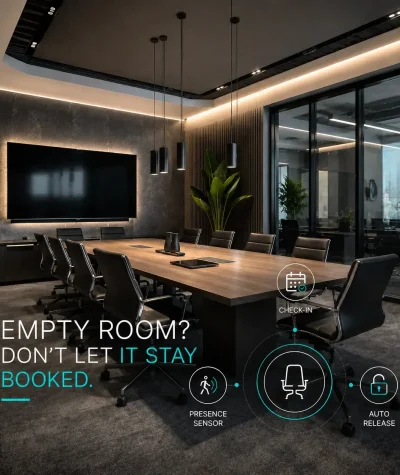
No-shows are one of the most common meeting room problems. A room is booked, nobody arrives, and the room stays unavailable in the calendar. A sensor solution can help support vacancy release workflows. If a room is booked but no presence is detected within a defined time window, the system may be configured to release the room so others can use it. This helps make shared meeting spaces more available during the workday. It can also reduce frustration for employees who need a room but see many spaces blocked by unused reservations.
3. Ad-hoc occupancy visibility
Not every room use starts with a calendar booking. Employees may step into a room for a quick call, a private conversation, or a short team discussion. A sensor can help identify that a room appears to be in use, even if the calendar does not show an active booking. This can support more accurate live room status and reduce the chance that someone walks into a room that looks free in the calendar but is occupied in practice.
4. Utilization analytics
Workplace teams need reliable data to plan office space. Calendar bookings are useful, but they do not always show the full picture. Occupancy sensors can help compare planned usage with actual room presence. Over time, this can support questions such as:
- Which rooms are frequently booked but rarely occupied?
- Which rooms are used without formal bookings?
- Are small rooms, large rooms, or huddle spaces in highest demand?
- Are recurring meetings blocking valuable rooms unnecessarily?
- Do current room policies match how employees actually work?
This type of insight can support better space planning, more realistic utilization analysis, and more informed workplace decisions.
How Occupancy Sensors Work with Room Booking Displays
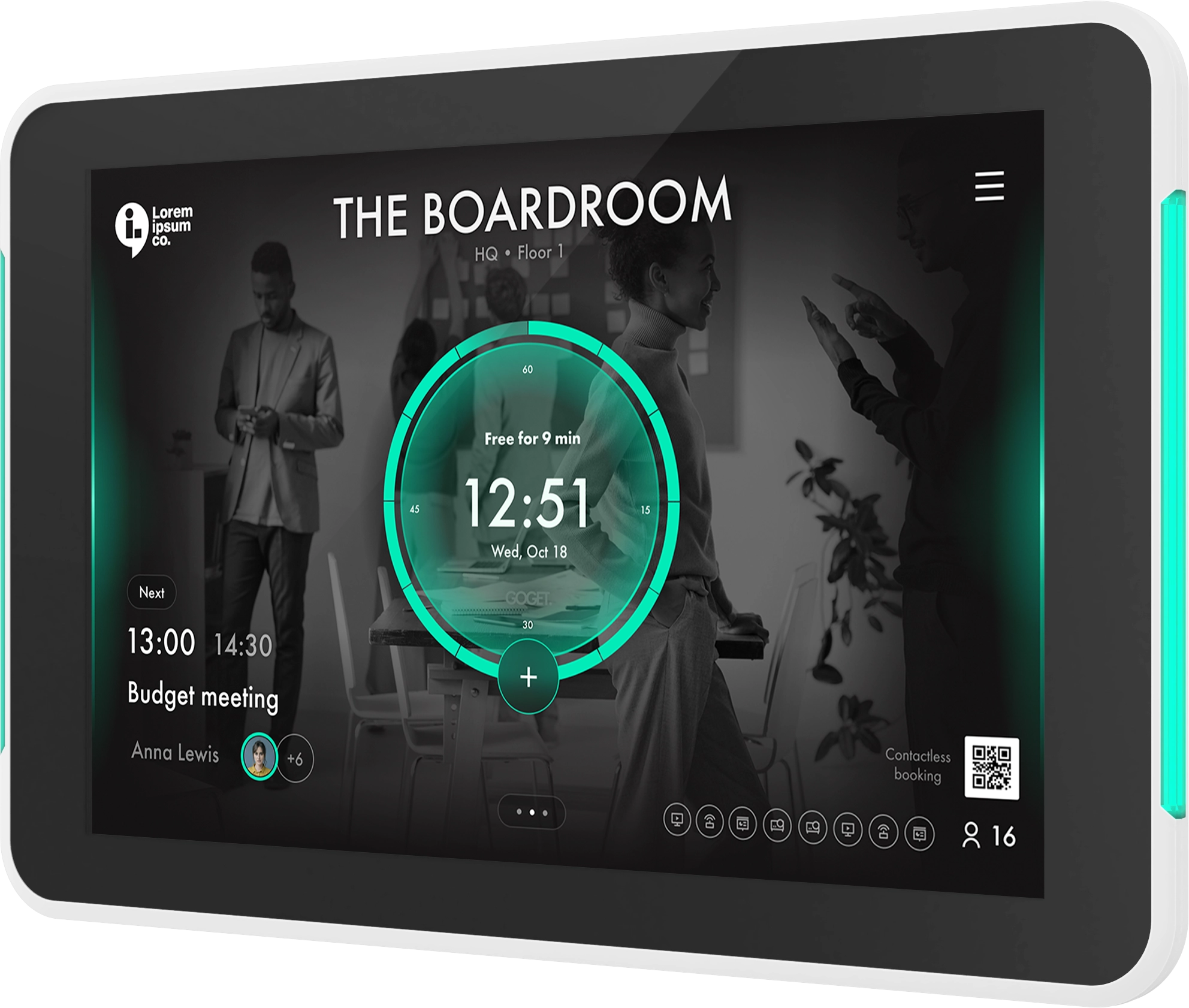
A meeting room display and an occupancy sensor solve different parts of the same problem. A
meeting room display shows room status at the door. It helps employees see whether a room is free, busy, or available soon. It can also support booking, check-in, schedule visibility, and room release workflows. A sensor adds physical room context. It helps the system understand whether the room appears to be occupied. Together, they create a stronger room booking setup:
- The calendar shows the reservation.
- The room display shows the status to employees.
- The sensor adds a real-world presence signal.
- The admin system can use that signal for automation, telemetry, and analytics.
This combination is useful because meeting room problems often happen at the boundary between digital planning and physical behavior. People book rooms digitally, but they use rooms physically. Occupancy sensors help connect those two realities.
Why Infrastructure Matters When Choosing Room Sensors
Not all room sensor deployments are equally simple. Some sensor systems require separate gateways, hubs, wiring, servers, or third-party services. That can make a sensor project more complex than expected, especially when rolling out across many rooms or offices. For IT and facilities teams, infrastructure matters because it affects:
- installation effort
- network planning
- device ownership
- troubleshooting
- maintenance routines
- rollout speed
- long-term administration
GOGET takes a different approach.
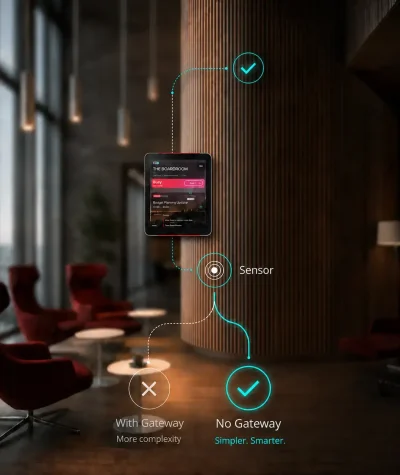
GOGET Room Sensors use low-energy Bluetooth communication and are designed to integrate directly with assigned GOGET One meeting room display hardware. This means the meeting room display can act as the local connection point for the sensor setup, without requiring separate gateway infrastructure for each sensor deployment. For organizations that already use GOGET One as their meeting room display, this can simplify the path from room booking to room-presence insight. The sensor becomes part of the room booking ecosystem rather than a separate IoT infrastructure project.
Key Questions Before Deploying a Room Sensor Solution
Before deploying a sensor solution, workplace teams should define what problem they are trying to solve. The right setup depends on whether the goal is better live availability, fewer unused bookings, more accurate analytics, or simpler check-in workflows. Here are the main questions to ask.
1. What should the sensor trigger?
Start with the workflow, not the device. Do you want the sensor to support:
- assisted check-in?
- auto-release of unused rooms?
- ad-hoc occupancy visibility?
- workplace analytics?
- room usage reporting?
- a combination of these?
Clear workflow decisions help avoid confusion later.
2. What type of sensor is being used?
Different sensors detect occupancy in different ways. A PIR sensor detects presence or movement using infrared sensing. Other sensor types may use radar, cameras, or other signals. For meeting room booking, it is important to choose a sensor type that fits the organization’s needs for privacy, accuracy, cost, room size, and deployment complexity.
3. What is the detection range?
A sensor must fit the room it is installed in. A small phone booth, a huddle room, and a large boardroom may require different placement decisions. GOGET’s occupancy sensor is listed as a PIR presence sensor with a presence detection range of up to 5 meters. For larger or unusually shaped rooms, placement and testing become especially important.
4. Where should the sensor be placed?
Placement has a direct effect on performance. A sensor should be positioned so it can detect relevant room activity without being triggered by movement outside the room. Common placement considerations include:
- seating area coverage
- room size and shape
- glass walls
- room entrances
- heat sources
- direct sunlight
- HVAC airflow
- movement in nearby corridors
Testing the setup in the actual room is important before standardizing placement across a larger rollout.
5. How is battery life managed?
Many room sensors are battery-powered. That makes installation easier because the sensor does not need new wiring, but it also means battery monitoring should be part of the admin process. A good deployment should make it easy to monitor sensor health and battery levels so facilities or IT teams can maintain the system without manual room-by-room inspection.
6. Does the system require extra gateways or infrastructure?
This is one of the most important questions for IT teams. Ask whether the sensor setup requires:
- separate gateways
- additional hubs
- new wiring
- extra servers
- third-party services
- separate network planning
A simpler architecture can make deployment easier, especially when sensors are being added to many meeting rooms.
7. How are privacy expectations handled?
Occupancy sensors should be introduced with clear communication. Employees should understand that the purpose is to improve room availability, reduce unused bookings, and support better workplace planning. The system should also be clear about what it does not do. A PIR presence sensor should not be positioned as identifying people, recording meetings, or counting individuals unless the technology explicitly supports those capabilities.
8. Who controls the settings?
Sensor automation should be manageable by admins. Workplace teams may need different rules for different rooms, locations, or work patterns. For example, a small focus room may need different release rules than a large client-facing boardroom. Admin controls help make the system fit real workplace behavior instead of forcing every room into the same rule set.
Meeting Room Occupancy Sensors and Workplace Analytics
A sensor solution is not only useful for live room status. It can also improve the quality of workplace analytics. Without sensors, workplace teams often rely heavily on calendar data. Calendar data can show what was booked, but not always what was used. This can lead to misleading conclusions. For example, a room may look highly utilized because it is booked most of the day. But if many of those bookings are unattended, the room is not being used as much as the calendar suggests. Another room may look underbooked but still be used frequently for informal conversations. Occupancy signals help workplace teams see the difference between reservation patterns and real-world usage patterns. This can support better decisions about:
- room mix
- capacity planning
- meeting policies
- recurring booking rules
- office layout changes
- future workplace investments
The goal is not to monitor employees. The goal is to understand how shared spaces are working and where the workplace experience can be improved.
How GOGET Room Sensors Support Room Booking Workflows
GOGET Room Sensors are designed as part of the GOGET room booking ecosystem. They are not positioned as standalone smart-building sensors. Their value comes from how they work together with GOGET One, room booking, admin controls, and workplace insights. With GOGET, sensors can support room-presence workflows such as:
- helping identify whether a room appears to be in use
- supporting assisted check-in for scheduled meetings
- helping release unused rooms when vacancy release is configured
- adding real-world presence signals to room analytics
- helping admins understand room usage more clearly
A key part of GOGET’s approach is that sensors communicate directly with assigned GOGET One meeting room display hardware using low-energy Bluetooth. This helps reduce infrastructure complexity because the setup does not require separate gateways, hubs, extra servers, additional wiring, programming, or third-party services. For workplace teams, this means occupancy sensing can become a practical extension of the room booking display rather than a separate technical project. You can learn more about the sensor setup on the
GOGET Room Sensors page, or explore how it connects with
GOGET room booking and
GOGET One meeting room display hardware.
Final thoughts
Meeting room automation helps connect room bookings with real-world room usage. It gives workplace teams a clearer view of whether meeting spaces appear to be occupied, whether booked rooms are actually being used, and how room behavior changes over time. The most effective sensor deployments start with a practical goal. For some organizations, that goal is reducing unused bookings. For others, it is improving live room availability, supporting check-in workflows, or making workplace analytics more accurate. When combined with a room booking system and professional meeting room display hardware, occupancy sensors can help make shared meeting spaces easier to manage and easier for employees to use. To see how GOGET connects room sensors directly with GOGET One meeting room displays, explore
GOGET Room Sensors.
FAQ
What is a meeting room occupancy sensor?
A meeting room occupancy sensor is a sensor that helps detect whether a meeting room appears to be in use. It can support room booking workflows by adding a real-world presence signal to calendar-based room reservations.
How does meeting room automation work?
A room sensor detects signals such as motion or presence, depending on the sensor type. In a meeting room booking setup, that signal can help indicate whether a room is occupied, unattended, or possibly available.
Can occupancy sensors count people?
Not all occupancy sensors count people. A standard PIR presence sensor detects presence or movement, not identity or individual headcount. People-counting should only be claimed when the specific technology supports it.
How do occupancy sensors help with room booking?
Occupancy sensors can support assisted check-in, auto-release of unused bookings, ad-hoc occupancy visibility, and utilization analytics. They help connect calendar bookings with actual room presence.
Do meeting room sensors require gateways?
Some systems may require gateways or additional infrastructure. GOGET Room Sensors are designed to communicate directly with assigned GOGET One meeting room displays using low-energy Bluetooth, helping reduce the need for separate sensor gateway infrastructure.
Are sensor solutions privacy-friendly?
Privacy depends on the sensor type, system design, and how the data is used. A PIR presence sensor should be described as detecting presence or movement, not identifying people or recording meetings. Organizations should communicate clearly about what the sensor does and does not collect.